
Automate Broadcast, Media, Telco operations and control and monitor all devices and systems across your network.
Powerful system and device monitoring, alarm management, and remote control capabilities from any connected device.

Broadcasters, telecommunication network providers, building management teams and infrastructure facility operators trust us for monitoring, control and management of their facilities and networked remote sites.
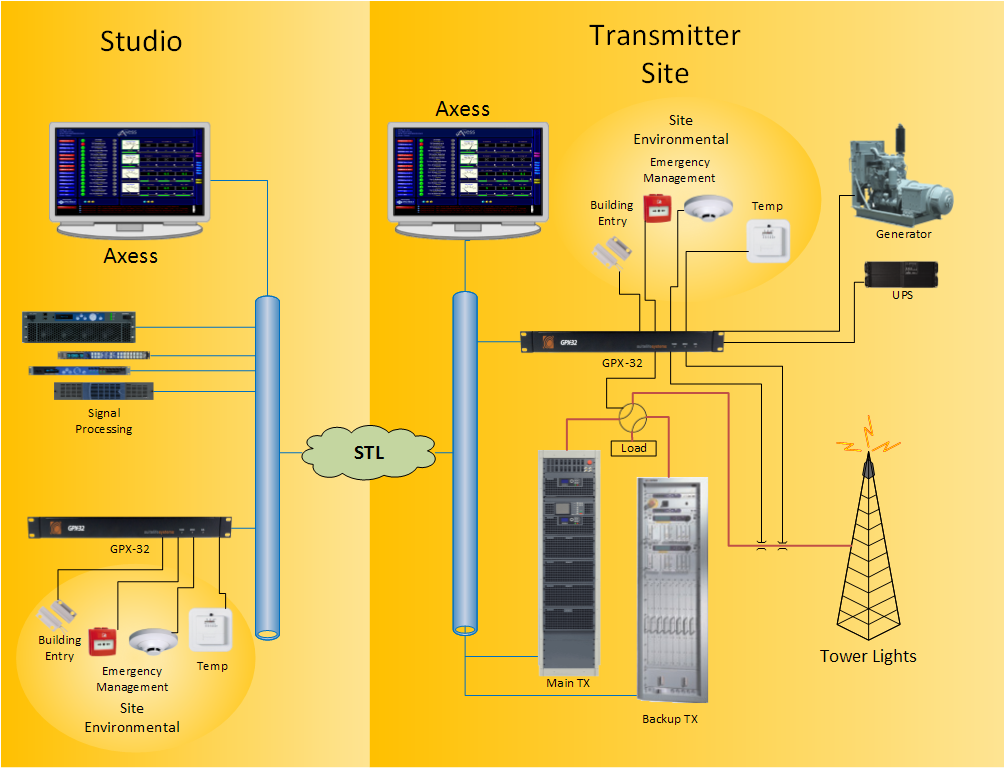
Automatically monitors customer-specified criteria, adjusts operational parameters when necessary, and provides comprehensive data logging and reporting. In the case of critical faults or failures, Axess deploys redundant systems providing peace of mind and effectively managing an auto-correction business model.
As you scale your network, Axess grows with you – configuring SNMP devices, supporting all protocols and connected devices on your network – whether on-site or remote.
You can view and analyze performance metrics, access logs, and other relevant information through interactive visualizations and reports within your Axess GUI.
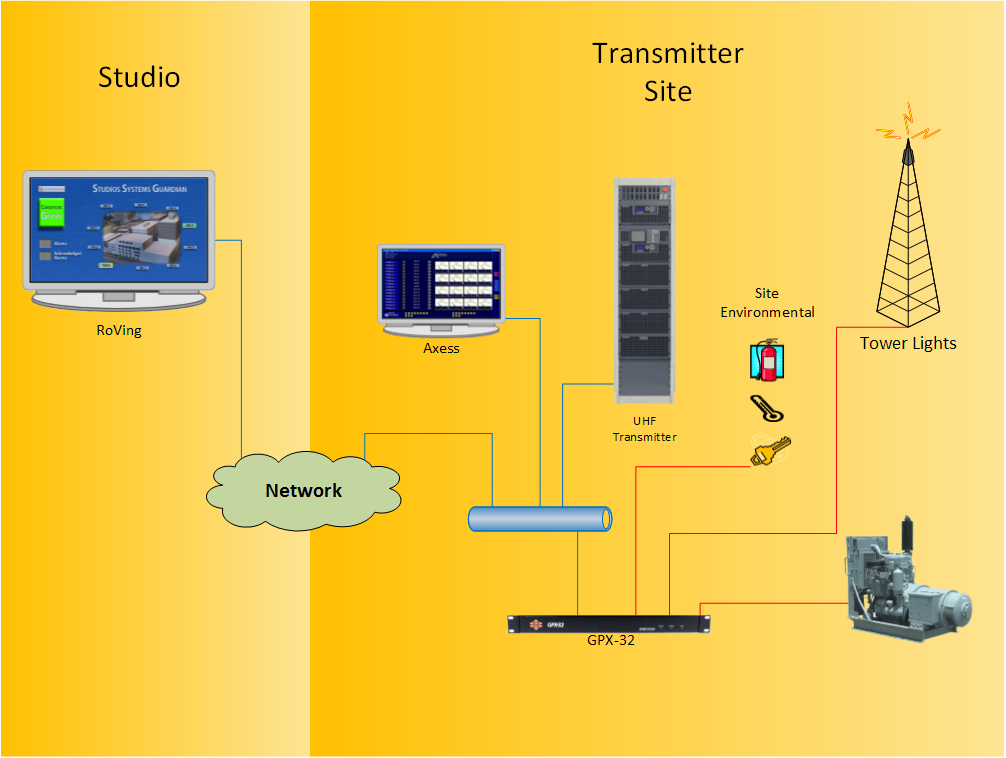
Aggregate and manage remote multi-site Axess systems across a network, whether they’re regional, national, or global. Seamlessly integrates with rOVIng for accessing, monitoring, controlling and logging real-time data across your network.
Axess runs on either of the following:
You will also need:
Yes, Axess can communicate over phone lines using most current types of modems.
Yes, Axess can communicate via RS-232 or RS-422 with a variety of serial devices, such as the suitelife systems universal interface device and other similar devices made by industry manufacturers.
Axess has the ability to send e-mail, pager message or give a voice-call notification should there be an alarm condition.
The OVI (Operator Visual Interface) is a graphics object-oriented screen that is created by the user to show signal or data flow, equipment layout, signal and routing configurations, building facility parameters such as AC power phasing, door alarms and operational variables, including alarms, warning messages, status and control conditions.
The total time depends on the number of installation sites and each site’s complexity.
Please read the Axess manual to review the pre-installation and PC machine requirements, OS setup, and software feature set.
Digital, analog, and graph meters are available and scalable depending on the user’s preferences.
Axess will work across a WAN or LAN
We recommend the user has a secure VPN type connection.
To use Axess to control a TFT EAS system, you will need two COM ports and one GPX-32: one for the EAS Receive Messages and one for the EAS Transmit messages.
A Sage Digital ENDEC requires one COM port. Since Trilithic utilizes SNMP no COM ports are required.
Depending on the configuration of your PC, you may need to add a serial port expander card to the machine for the COM ports.
Many standard temperature, humidity, and environmental probes can be connected to Axess.
Axess includes an SCL (System Control Language) feature so users can set up scripted routines for each control, status, and analog channel.
This allows the system to automatically perform specific user-defined actions.
Each user is assigned a password level that determines their ability to activate controls or perform functions in the system.
Building systems with a parallel interface in the form of voltage or contact closure can be set up and monitored on the Axess system through the GPX-32 interface device. Any systems with SNMP interfaces can also be monitored.
Axess generates user-defined (filtered) event and analog reports
Using plug-ins, Axess can interface with many devices using TCP/IP, parallel, serial, USB, Modbus (Serial & TCP/IP) and SNMP (MIB) connections.
Custom plug-ins can be created to connect to specialized devices or systems
Axess runs on either a workstation or a server:
SuiteLife Systems can also supply Axess pre-installed on Dell server class hardware ready to use out of the box.
We use cookies to improve your experience on our site. By using our site, you consent to cookies.
Manage your cookie preferences below:
Essential cookies enable basic functions and are necessary for the proper function of the website.
These cookies are needed for adding comments on this website.
You can find more information in our Cookie Policy and .